Cold Office Solutions: Practical Ways to Stay Warm at Work

If you spend your workday shivering at your desk, you're far from alone. One of the most common workplace complaints is that the office is simply too cold. Whether it's aggressive air conditioning in summer or conservative heating during winter, many employees spend hours trying to concentrate while their hands, wrists, and feet never seem to warm up.

The problem goes beyond comfort. Working in a cold office can affect typing speed, concentration, and overall productivity. Cold muscles become stiff, fingers lose dexterity, and simple tasks start taking longer than they should. If you've ever found yourself rubbing your hands together before answering an email or pausing work just to make another cup of coffee, you've experienced how temperature quietly impacts your performance.

Why are offices so cold in the first place? Shared workplaces are designed around a single thermostat serving dozens—or even hundreds—of people with different preferences. What feels comfortable to one coworker feels freezing to another. Add large open-plan spaces, powerful HVAC systems, and employees sitting still for hours at a computer, and it's easy to see why so many people search for cold office solutions.

The good news is that you don't have to accept being uncomfortable. There are plenty of ways to stay warm in a cold office, but some work much better than others. The best solution depends on where you're actually feeling cold. If your hands are the first thing to go numb while typing, warming your workspace directly is often far more effective than trying to heat the entire room.

Why Cold Offices Hurt Productivity

Most people assume being cold is simply uncomfortable. In reality, it can have a measurable impact on the quality of your work.

When your hands become cold, blood vessels naturally constrict to conserve body heat. This reduces dexterity, making typing, writing, and precise mouse movements feel slower and less natural. Even if you're not consciously thinking about the temperature, your attention is constantly being pulled toward discomfort.

The challenge is especially common in offices where the thermostat becomes a daily compromise. One person is comfortable while another wears an extra sweater, and someone else quietly wishes they had brought gloves. Since individual employees rarely control the temperature, many simply learn to work through it.

Unfortunately, pushing through isn't always productive. Cold hands can lead to:

  • Slower typing speeds
  • Reduced mouse precision
  • More frequent breaks to warm up
  • Difficulty maintaining focus
  • General discomfort throughout the workday

For desk workers, the problem isn't usually that their entire body is cold—it's that their hands stay in constant contact with a cold desk while remaining almost completely still for hours at a time.

“The only heated desk pad built for daily professional use.”

Heatka Classic — 6 heat settings, 2-year warranty, free delivery.

See the Heatka Classic →

Common Cold Office Solutions (And Their Limitations)

People working in a cold office usually try several solutions before finding one that actually fits their workflow.

Dressing in More Layers. A sweater or fleece certainly helps keep your core warm, but it doesn't do much for your hands resting on a cool desk surface. Once your fingers get cold, extra clothing often isn't enough.

Keeping a Blanket at Your Desk.Desk blankets are popular during winter, especially for remote workers. They keep your legs comfortable but leave your hands exposed—the very part of your body doing the work.

Using a Space Heater. Space heaters warm the air around your desk but consume significantly more electricity than desk-focused heating. They also tend to warm your legs and torso while your hands continue resting on a cold desktop.

Disposable Hand Warmers. These provide temporary warmth but need constant replacement, create ongoing costs, and occupy your hands when you're trying to type or use a mouse.

Heated Gloves.Fingerless gloves improve warmth somewhat but reduce dexterity and can make typing, writing, and using touchscreens feel awkward during a full workday.

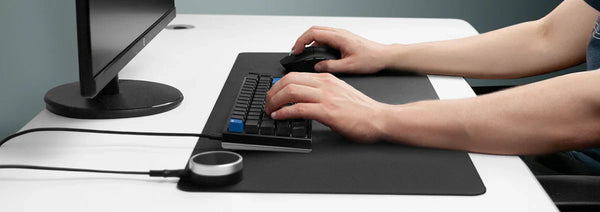
A Heated Desk Pad.Unlike the alternatives above, a heated desk pad warms the exact area where you spend your day working. Instead of trying to change the temperature of the entire office, it creates a comfortable workspace around your keyboard, mouse, and wrists—where the cold is usually most noticeable.

“Neat design and generous size. Has really helped to alleviate my cold hands (Raynaud's Syndrome) and would highly recommend.”

— Rob B - United Kingdom

What Is a Heated Desk Pad?

A heated desk pad is a large-format mat that sits on your desk surface and generates gentle, consistent heat across its full area. Unlike a heated mouse pad—which only covers the space under your mouse—a heated desk pad is wide enough to accommodate your keyboard, mouse, and wrist rest area simultaneously. The heat comes from a thin heating element embedded beneath the surface material and delivers consistent warmth exactly where your hands spend the most time.

How Does the Heat Actually Reach Your Hands?
Rather than heating the surrounding air like a space heater, a heated desk pad transfers warmth directly through contact. As your palms and wrists rest on the surface, gentle conductive heat keeps them comfortable throughout the day.

Because the warmth is delivered exactly where it's needed, the system is remarkably efficient. You're warming your hands instead of trying to heat an entire office.

How Warm Does It Get?
Quality heated desk pads offer multiple temperature settings rather than a single fixed heat level. Lower settings provide gentle everyday comfort, while higher settings can help people who naturally experience colder hands or circulation issues.

Multiple timer options and automatic shut-off also make it easy to leave the pad running throughout the workday without constantly thinking about it.

Who Benefits Most?
A heated desk pad isn't necessary for everyone. It's designed for people whose work is regularly interrupted by cold hands.

It is especially useful for:

  • Office workers dealing with shared thermostats.
  • Remote workers keeping heating costs down.
  • People with naturally cold hands or poor circulation.
  • Anyone who spends long hours typing during colder months.
  • Professionals who want to improve comfort without heating an entire room.

If you're searching for how to stay warm in a cold office, chances are you're exactly the type of person who benefits most.

The Heatka Classic meets every one of those criteria.

80×33cm PVC leather surface. 6 heat settings (30–55°C). Edge-stitched construction. Up to 12-hour auto shut-off. 2-year warranty. Free delivery to UK and US.

See the Heatka Classic — Free Delivery →

What to Look for When Buying a Heated Desk Pad

Not every heated desk pad is built the same. Before buying, consider:

  • Surface coverage: Choose a size that comfortably fits both your keyboard and mouse.
  • Even heat distribution: Avoid pads that only heat the centre.
  • Quality construction: Bonded or stitched construction lasts significantly longer than glued alternatives.
  • Multiple temperature settings: Six heat settings provide greater flexibility throughout changing seasons.
  • Adjustable auto shut-off: More timer options make all-day use easier.
  • Premium surface material: PVC leather provides durability, easy cleaning, and a smooth mousing surface.
  • Warranty: A quality product should be backed by at least a two-year warranty.

Is a Heated Desk Pad Worth It?

If cold hands regularly affect your comfort, concentration, or productivity, absolutely.

Unlike many cold office solutions that try to warm your entire environment, a heated desk pad focuses on the area where you actually work. It helps keep your hands comfortable while typing, reduces the need for bulky layers or expensive space heaters, and makes long hours at your desk far more enjoyable.

For someone who works in a consistently warm office, it may not be necessary. But if your daily routine involves working in a cold office, it's one of the simplest and most effective upgrades you can make to your workspace.

Ready to stop fighting the office thermostat?

Discover how Heatka's heated desk pads keep your hands warm, improve comfort, and help you stay productive—even when the office temperature says otherwise.

Common Questions

Why are offices always so cold?

Many offices use centralized heating and cooling systems designed to keep large spaces comfortable for most people. Unfortunately, what feels comfortable for one person can feel freezing to another, especially during long hours of desk work.

How can I stay warm in a cold office?

Wearing layers, drinking warm beverages, and using desk-focused heating solutions like a heated desk pad can help you stay comfortable without changing the office thermostat.

Does working in a cold office affect productivity?

Yes. Cold hands and stiff fingers can reduce typing speed, make precise tasks more difficult, and make it harder to stay focused throughout the workday.

Are space heaters the best solution for a cold office?

Space heaters can warm the surrounding air, but they often use more electricity and don't directly warm your hands where you need it most. A heated desk pad provides targeted warmth exactly where you work.

What is the best cold office solution for desk workers?

If your hands are the first part of your body to get cold, a heated desk pad is one of the most effective solutions because it warms your keyboard, mouse, and wrist area throughout the day.

Is a heated desk pad better than wearing gloves?

For most people, yes. A heated desk pad keeps your hands warm without affecting your typing, mouse control, or dexterity, making it a more practical option for everyday office work.

If this describes your situation

The Heatka Classic is built for exactly this.

Full-surface warmth. 6 heat settings. Edge-stitched PVC leather. 2-year warranty. Free delivery to UK and US. No app. No setup. Plug in and it works.

Shop the Heatka Classic — Free Delivery →

2-year warranty · 100% satisfaction guarantee · Free UK & US delivery

More Articles